Showing posts with label Facebook. Show all posts

Friday, August 26, 2016

abhishek

How To Recover Facebook Deleted Images or Messages.

Hey Friend Here We are again with New Trick & tips . Today we will Know How we will Recover Facebook Deleted Images or Messages easily , According to Today's Trends Facebook is  Compulsory to Use everyone, But  many times we Delete our Message and images , But then after we want those messages & Photos , So Read  this Article Carefully to Get Know it  .


Tricksfarm.blogspot.in


How You'll Recover Facebook Deleted Images or Messages :- 


1. First of All Login to your Facebook . 

2. Now Goto Facebook Setting Section. 


3. Now Click on Below  on " Download a Copy " .
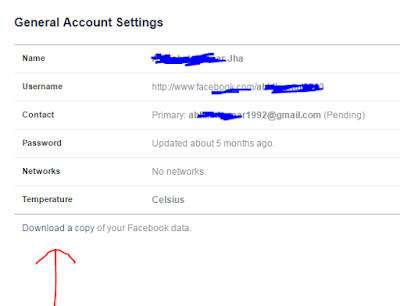


4. Now You'll see it , Now click on "Start my Archive". 


5. Now A Popup  Box will Open  and ask to your Facebook Password . 


6. Now they  will Ask  you to Start Archive and  Press Ok . 


7. A Copy of  Archive will Automatically Send to your Facebook Registered Mail id. 

8. Now You'll see a Link in your mail . 

9. Open that link and Download  Your Facebook Archives. 

10. A Zip file will be Downloaded  , Unzip it . 

11. You'll see Index.htnl . open it and see your Deleted  Messages or Images. 


Read More

Thursday, August 25, 2016

abhishek

How to Secure Facebook Account Against Hacking.

Hey Friend Welcome  To our Community "Trick farm",  today we will Know how to Secure  Facebook account ,  Most of them are using Facebook, But there are  many Friends or enemies who want to  Hack  your Facebook  Account so Friend today we will Learn  How  to secure  Facebook account against Hacking . 


How We can secure Facebook Account Against Hacking :-

1. First Login your Facebook Account. 

2. Now Goto Setting on Top Right . 


3. Now Goto  Security Setting Tab. ( Setting >>Security).

4. Now You'll  see A list of Names, Login Alert , Code Generator , etc. 

5. Now Trick is START. 

6. Click on Login Alert.

7. Now  Select "Get Notification "  &  "Text alert send to " . 


8.  Now Click on "Your Trusted Contacts ". & select Any 3-4 Trusted Person or  Friend on them you can Believe. 

9.  Now Click on Legacy Contact  and Add a Trusted Family  or Friend  Friend  . if  something  Happens  , this  Feature  will Save you. 

10. Now Come to  " Privacy Section ".

11. Now Select " Who can see my Stuff ". as Private. 

12. Now "Select Who can Contact me "  as Friends of Friends. 

13. Now adjust " who can look me Up "  with Friends option. 

14. Always  take  Mobile Contact option as " Private ".

15. Always Use Password  ( Letter+Special Symbol+No.) i;e Priya@3697455


 If you Do Above Settings  Your Account Will Never Hacked. 


Read More

Sunday, August 21, 2016

abhishek

How To Change Facebook Account Password .

Hey Friend today we are Going to Tell you , How to Change Your Facebook Acoount Password, many times  New facebook users  Searching on Google or asking from their Friends How we can change Facebook password . See Full Article. to Get know it . 


How You Can Change Facebook Account  Password :- 

1. First Login Into your Facebook.

2. Now Goto Top Right Section on facebook .


3. Now Goto "Setting".


4. Now  Goto "Password".

5. Now Click on Password  and then Put Current password then  New & Retype.


6. Its Done!! Password is Changed. 


Read More
abhishek

How To Make/open Free Account in Facebook.

Hey Friend Today We are Discussing  How to Make Free Account in Facebook or How to open a Account in Facebook Free .Many Users who are new on Internet Don't Know How To use Facebook , So Read this Post and Get know How to Open a Facebook account Free.


How To Open a Facebook Account Free :- 

1. First Goto  Facebook.com.

2. Now you will see a Form  like this 


3. Now Fill All Details in it . 

4. Fill Correct  email  id for Verifying Processes.

5. Now Verify your Mobile No or email id. 

6.That's it ! its  Done . Now enjoy facebook. 


Read More